Can an interviewer tell you're using AI? Nine tells
There's no reliable AI detector for a conversation — not in Zoom, not in hiring platforms. There are nine behavioural tells an experienced interviewer reads without any software, and eight of them are about the person, not the program.
Start with the technical half, because it's the simpler one.
No software determines over a video call that a candidate is reading a prompt. Zoom, Meet and Teams don't tell the host which window you have focused — attendee attention tracking was removed in 2020. An assistant window can be excluded from screen sharing with supported OS mechanisms, and that works.
Then there's the human. An experienced interviewer spots reading without any software at all. Here's how.
Nine tells
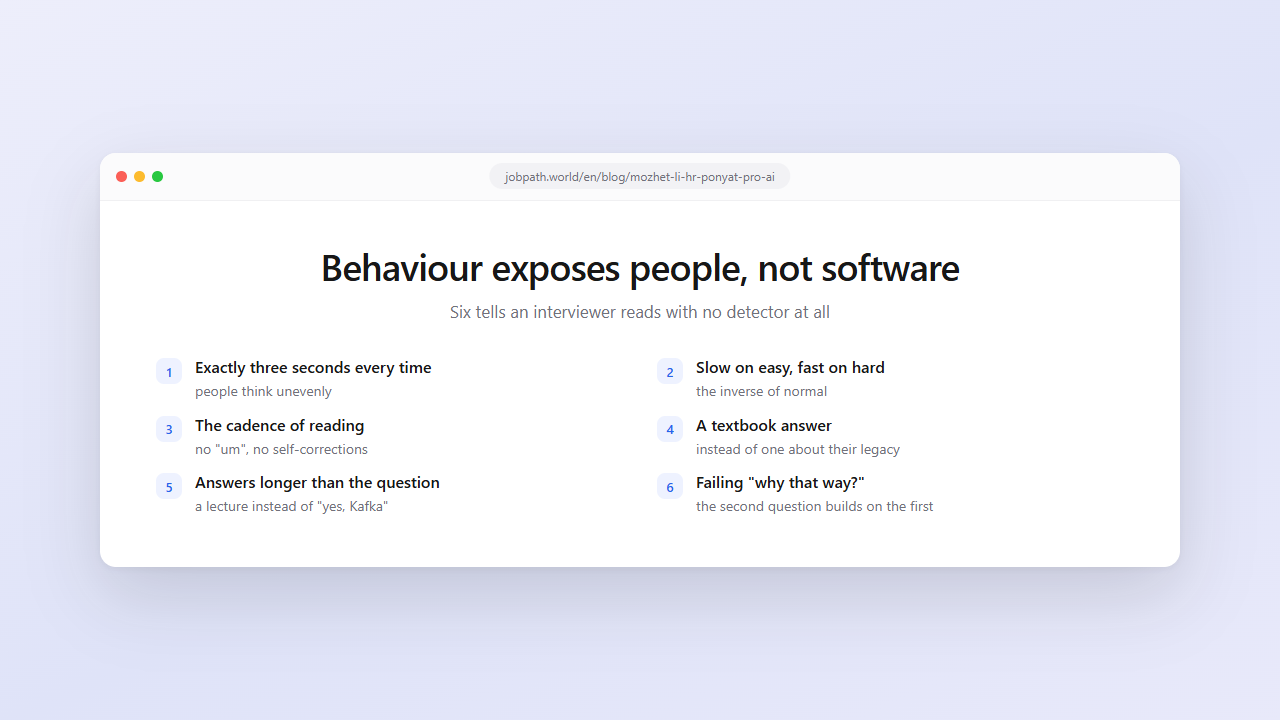
1. The same pause before every answer. People think unevenly: half a second on "tell me about yourself", five on "describe the worst incident you've handled". Exactly three seconds before every answer, easy ones included, looks like a technical delay because it is one.
2. Inverted difficulty. The related tell: slow answers to easy questions and fast ones to hard questions. Humans do the opposite.
3. Eyes. Reading is horizontal eye movement with returns. Recalling is a glance up or aside and back to the other person. In a small video window that difference is more visible than people expect, especially when the camera is on top and the text is at the bottom of the screen.
4. The cadence of reading. Even pace, no pauses in unexpected places, no "um", no self-corrections like "well, more precisely". Spoken language is uneven, and evenness is a signal.
5. Written phrasing in speech. "It should be noted", "this approach", "within the scope of the project". People don't talk like that; they write like that.
6. A textbook answer instead of a situational one. The interviewer says "we have legacy on an old version of the framework, how would you approach it?" and gets general reasoning about technical debt. The model doesn't know the company's context — but a candidate who was listening does, because it was discussed five minutes ago.
7. Answers longer than the question. Asked "have you worked with queues?", a person says "yes, Kafka on project X". A prompt produces a three-minute lecture on message brokers. Excess is one of the most visible tells.
8. Failing the follow-up. The interviewer's main instrument. "Why that option?" "What if the data grows a hundredfold?" "What would you do differently now?" The first answer can be read; the second builds on the first; the third requires understanding.
9. A gap between talk and work. A candidate reasons like an architect and then loses the thread on a simple question about their own code from their resume. Or the reverse: writes confidently, explains bookishly.
Eight of the nine have nothing to do with software. They come from being unprepared — the prompt lands on someone who can't make it theirs.
What interviewers do when they suspect
There's plenty of talk about "AI detectors" in hiring. In practice an experienced interviewer changes tactics rather than tools:
- Follow-ups that go deeper. Three "why"s in a row on the same topic.
- Changing the problem mid-answer. "Now assume the database is read-only." A prepared answer falls apart.
- Questions about your own experience. The model knows nothing about the project in your resume beyond what you loaded into it.
- Asking you to reason out loud. Not the answer but the path to it — the thing prompts supply worst.
- Returning to an earlier answer. "You said you used X. Why not Y?" That tests the coherence of the conversation, not one reply.
All of these predate AI: they were used on memorised answers long before. There are simply more of them now.
About detection software
Online assessments and proctoring systems — HireVue, CodeSignal, HackerRank and similar — operate inside their own environment and can record window focus loss, clipboard pastes or logins from another device. That's stated in their rules, which usually also prohibit outside help outright.
That's a different situation from a live conversation on Zoom. We deliberately stay out of it: a prompt in a conversation and a prompt inside a recorded test are different genres with different costs of being wrong.
How to use a prompt without any of this showing
All nine tells reduce to one thing: the problem isn't glancing at a screen, it's that the prompt takes the place of thinking. Which suggests the fixes.
Take the structure, not the words. Read three key points and say them in your own vocabulary with your own examples. The answer gets shorter and more alive at the same time.
Speak while you read. "Good question, give me a second" is a normal sentence that buys three seconds and sounds better than silence.
Let pauses vary. Not as an act — different questions genuinely take different amounts of thought, if you're actually thinking.
Prepare the repeating questions. "Tell me about yourself", "why are you leaving", "your weaknesses", "salary expectations" appear in every interview. Mock interviews close those so completely that no prompt is needed, leaving it as insurance for the unexpected.
Don't answer what you don't understand. An honest "I haven't worked with that, but from the description it resembles…" beats a paragraph read aloud with nothing behind it.
The short answer
Can an interviewer tell? Software, no. A person, yes — if you're reading instead of talking.
So the useful question isn't "will they notice" but "could I explain this if they asked again". If the answer is yes, none of the nine tells appear: you're using the prompt the way an engineer uses documentation — as support, not as a script being read for you.
FAQ
Can Zoom detect that I'm using an AI assistant?
No. Zoom, Google Meet and Microsoft Teams don't report which window you have focused, and attendee attention tracking was removed in 2020. An assistant window is excluded from screen sharing through supported OS mechanisms.
How do interviewers know a candidate is reading answers?
Behaviour: identical pauses before every question, the even cadence of reading, written phrasing in speech, textbook answers instead of situational ones, and above all failing the follow-up "why that way?".
Do AI detectors for interviews exist?
Not reliably, for a live conversation. They exist in proctoring and online-assessment platforms, which run in their own environment and can log window focus loss or clipboard pastes — and say so in their rules.
What gives candidates away most often?
The follow-up question. The first answer can be read, but the second builds on the first and the third requires understanding, which is where the gap between knowing and reciting becomes obvious.
How do I use a prompt without it showing?
Take the structure and speak in your own words, mark the pause out loud ("give me a second"), never answer something you don't understand, and prepare the repeating questions in advance so the prompt stays insurance for the unexpected.
Is using AI in an interview allowed?
No law covers it; company and platform rules do. We looked at where AI in interviews is banned and where candidates are invited to bring their own tools.