How automatic job applications actually work, step by step
"A bot applies on my behalf" sounds alarming until you see what actually happens. The full path from pressing Start to an application sitting in your own account — and the lines a service shouldn't cross.
Auto-apply is simultaneously the most underrated and the most alarming feature in job-search software. The alarm is fair: "a bot sends applications in my name" sounds like a way to damage your reputation at scale.
So here's the mechanism, step by step: what happens inside, what the job board sees, and where a sane service stops.
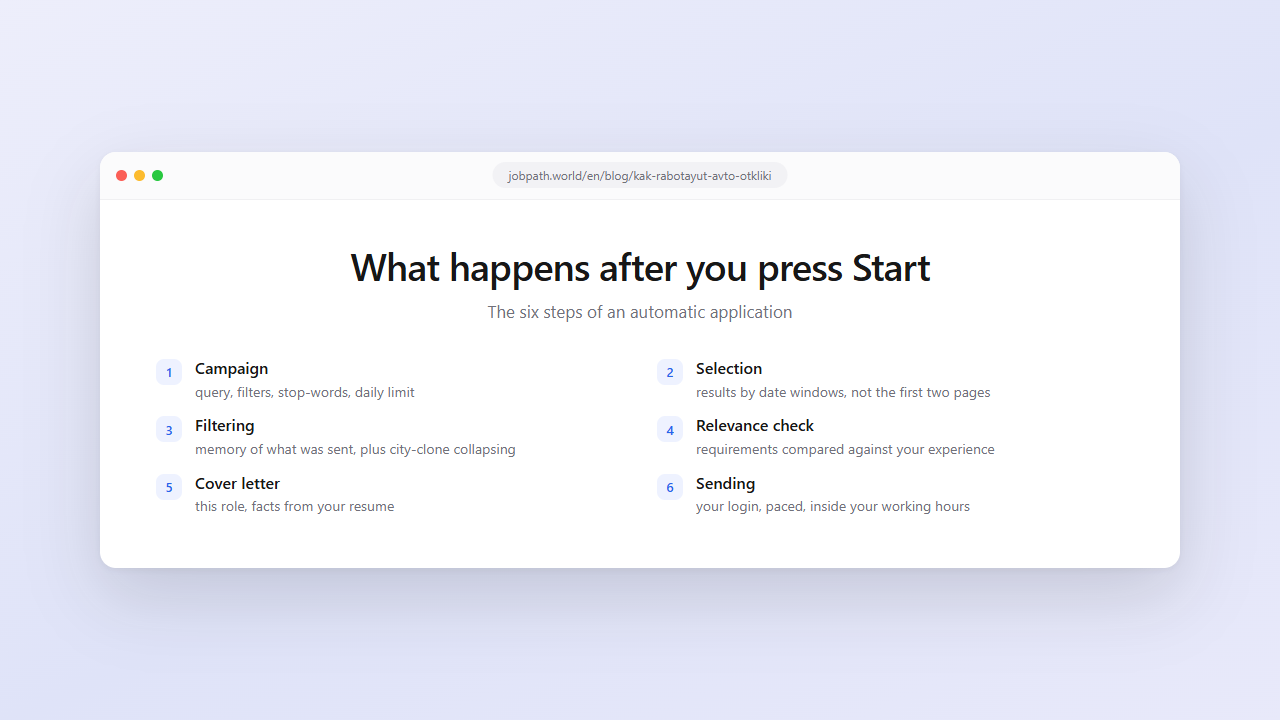
Six steps after you press Start
1. The campaign. You set a search query ("python developer"), filters — region, minimum salary, seniority, work format, stop-words — a daily limit and a total application budget. One setup for the whole search; you don't come back to it.
2. Selection. A background process walks the results of your own search, splitting them into windows by publication date so the pool includes more than the first few pages — including roles posted yesterday.
3. Removing what's already sent. Every role is checked against your history: if an application already went out, a second one doesn't. We keep that history for months. Clones get collapsed separately — the same role is often posted in several cities, and without de-duplication one job absorbs five applications.
4. The relevance check. Before sending, the role is checked against your resume and filters — a model compares requirements with experience. This isn't a formality: it's where a "python developer" posting demanding ten years of experience gets cut from a junior's campaign, along with roles that matched on one word in the title.
5. The cover letter. Generated for that specific role: its description and requirements on one side, your resume on the other, so the letter is built from facts about your experience rather than from a template about being a motivated team player. More on letters.
6. Sending. The application goes out through your own login on the job board, with a pause between sends and inside the working hours you set. In your account it looks exactly like one you sent by hand — because that's what it is.
How this differs from a click-bot
The difference isn't cosmetic, and it's worth understanding before trusting any service with your account.
It runs in your account, on your instruction, through your login. No fake accounts, nothing sent "on behalf of the service". You can see the full history in your own job-board account and stop the campaign with one button.
It respects the platform's limits. Pauses between applications, a daily cap, backing off when the board answers "too many requests". A service that floors the accelerator drives your account into a captcha and a block, which hurts you first.
It doesn't touch anyone else's data. No scraped job database, no exports, no working around the board's terms — it's your search inside your account.
It doesn't lie in the letter. The cover letter is assembled from your resume. A service that invents experience you don't have gets you caught on the first call, and that costs more than the time it saved.
What auto-apply should never do
Short list, and an important one.
Apply indiscriminately. Automation without a relevance check is a rejection generator. The point of filters and the fit gate is that applications land where you have a chance.
Pass for a human where that changes the substance. An application is a standard action in the board's own interface. Completing a take-home assignment or an interview for you is a different thing, and automation has no business there.
Run blind. You must be able to see where applications went and stop them. A service that shows only a counter is hiding the part that matters.
What happens when something goes wrong
Worth knowing in advance, because these are normal states.
The daily limit is spent. The campaign stops until tomorrow and resumes on its own.
The board answered "too many requests". A pause of a few minutes, then it continues.
A captcha appeared. The campaign halts: only a human can pass a "prove you're human" check, manually, in a browser. After that the campaign picks up again.
The access token expired. Reconnect the account once.
None of these mean your account is damaged. They're the platform's normal responses to automation, and the correct behaviour for a service is to slow down rather than keep hammering.
What it actually saves
Realistically: applying by hand means opening the posting, reading it, deciding, writing a couple of lines, sending. A minute and a half if you don't get distracted. Forty applications a day is an hour and a half of monotony, every day, for weeks.
Automation takes that part. It doesn't replace your resume or your interview — it removes the routine between them. The interview is still yours, and that's how it should be.
FAQ
Is auto-apply safe?
If the service respects the platform's limits, yes. Applications go through your own login, with pauses and inside a daily cap, and appear in your account like manually sent ones. The risk comes from sending without pauses or without a relevance check, not from automation as such.
Can an employer tell an application was automated?
There's no marker on the application: it's a standard action in the board's interface performed in your account. What makes an application stand out is irrelevance — a mid-level engineer applying to a lead role in an unfamiliar stack is obvious regardless of who sent it.
Who writes the cover letter?
A model, using that specific job description and your resume. The point is that the letter rests on facts from your experience rather than a template. A service that adds experience you don't have gets you caught on the first call.
Can I stop a campaign?
Yes, at any moment, with one button. Applications already sent stay in your history, exactly like manually sent ones.
What if the campaign stops by itself?
Check the reason. Usually it's the daily limit (resumes tomorrow), a captcha (needs a human in a browser) or expired account access (needs reconnecting). All three are normal.
Does auto-apply replace a good resume?
No. Automation increases how many applications go out; the resume and the accuracy of your filters decide how many turn into invitations. If a hundred applications produce nothing, volume won't help — check the resume and narrow the search.