What HireVue, CodeSignal and HackerRank actually record
An online assessment and a Zoom call are different genres. One officially records your screen, camera and tab switches; the other records nothing. Here's what each of the three big platforms captures, from their own documentation.
First, separate two things that get confused constantly: a live call and an online assessment sit at completely different levels of surveillance.
On a Zoom, Meet or Teams call, the service doesn't tell the interviewer which window you have focused and doesn't track tab switching — attention tracking was removed in 2020.
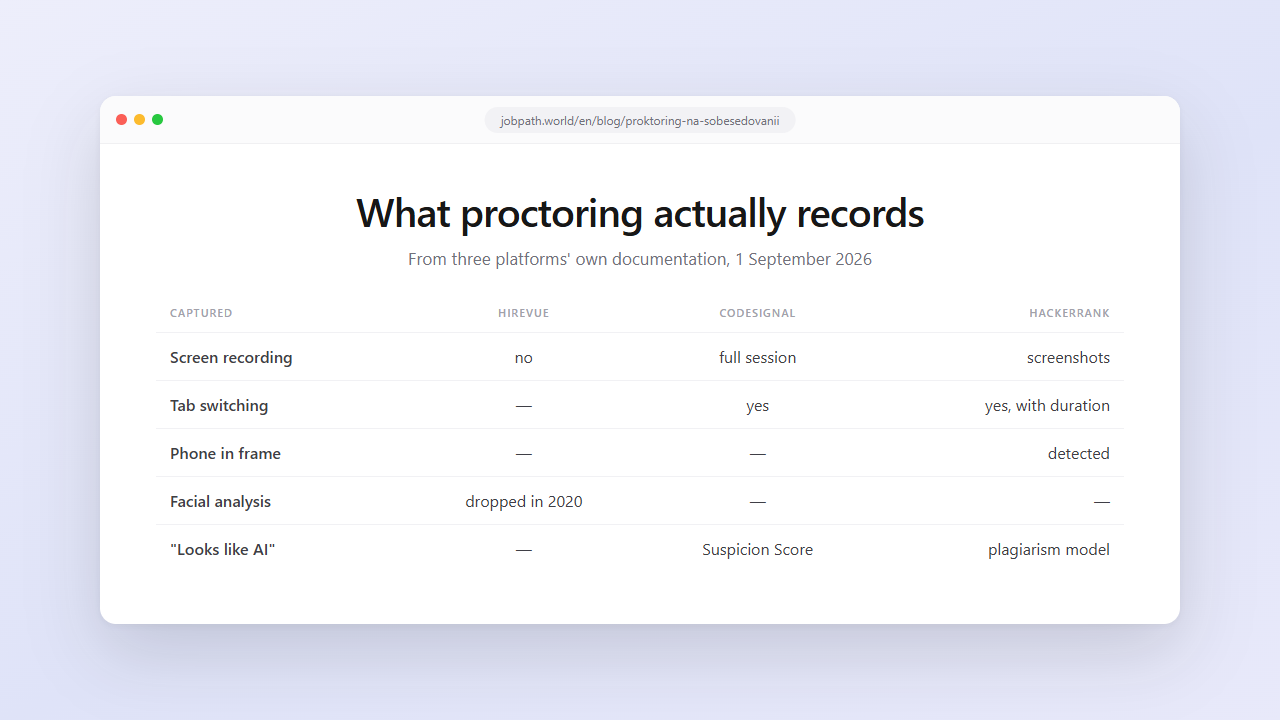
In an online assessment it's the opposite: the platform records behaviour openly, and documents that it does. Below is what each of the three biggest platforms captures, from their own help centres, as of 1 September 2026.
The short table
| Captured | HireVue | CodeSignal | HackerRank |
|---|---|---|---|
| Candidate video | yes, the recorded answer | yes, full session | in Proctor Mode |
| Screen recording | no | yes, full session | screenshots, AI analysis |
| Microphone | yes | yes, full session | — |
| Photo ID check | — | yes | — |
| Tab switching | — | yes | yes, with duration |
| Copy and paste | — | yes | blocked in Secure Mode |
| Second monitor | — | — | blocked |
| Phone in frame | — | — | detected, image attached |
| Facial expression analysis | dropped in 2020 | — | — |
| "Looks like AI" scoring | — | Suspicion Score | plagiarism model |
HireVue: facial analysis is gone
People still repeat the old story about HireVue: "the AI watches you frown and lowers your score." That's five years out of date.
The system did once evaluate facial expressions through third-party technology from Affectiva, combining them with voice to score traits like emotional intelligence. In March 2020 the company dropped visual analysis. Its public explanation: advances in natural language processing made speech analysis more predictive, while non-verbal data contributed roughly 0.25% of the model's predictive power. In parallel, the privacy group EPIC had filed a complaint with the US Federal Trade Commission.
Today, by their own account, the AI scores only what the candidate says: it doesn't assess or interpret facial expressions, body language, emotions or your background.
The practical consequence is to invest in the substance and structure of the answer rather than in smiling at the lens — though a human still watches the recording afterwards, and to that human your delivery does matter.
CodeSignal: the whole session is recorded
The densest surveillance of the three. In a proctored assessment the candidate shares camera, microphone and screen for the entire test and shows a government-issued photo ID to confirm identity. All of it is recorded, and after the test their verification team reviews the recording.
On top of the recording sits the Suspicion Score — a trust rating for each submission, from "None" to "High". It aggregates several signals: the platform compares the solution against patterns drawn from millions of assessments and flags indications of generative AI or unauthorised resources. Their public materials also mention behavioural telemetry, such as unusual typing or speaking rhythm.
The platform names four violation categories it targets: copy-paste plagiarism, proxy test-taking, unauthorised AI use and identity fraud. A 2025 press release from the company states that fraud attempts more than doubled year on year.
HackerRank: two modes, and the gap between them is large
Secure Mode is the baseline: the test runs full-screen, copy and paste are blocked, multiple monitors are prevented, and switching tabs raises an alert.
Proctor Mode adds AI features on top: screenshot analysis, plagiarism detection and webcam monitoring.
Tab proctoring is worth understanding precisely: it records not just that you left the test window but how many times and for how long. Those numbers land in the recruiter's summary report and in the CSV export.
The webcam in Proctor Mode monitors presence: if the candidate isn't visible, or several faces appear, a warning fires and the event is logged. Separately, the system detects phones and tablets in frame — including partially visible ones — and attaches the captured image to the report.
Plagiarism detection analyses behaviour, the evolution of the code and similarity between submissions; the accuracy the platform states for its own model is 93%.
What this means for a candidate
False positives are real. If a plagiarism model is wrong 7% of the time, and a family member walked through frame, your report carries a flag. Not a verdict, but a conversation.
Take your phone off the desk. Face down and only half in frame is still detected, and the image goes into the report.
Check the conditions before you start. One monitor, closed tabs, nobody in the room, stable lighting. Half of all flags are about the environment, not about cheating.
Don't keep a reference open in the next tab. Secure Mode logs it with duration, and "left the window for four minutes" reads only one way.
Read what you're agreeing to. Screen, camera and microphone recordings are personal data. It's worth knowing who stores them and for how long; the platforms describe it in their policies.
Remember it's a different genre. Assessment rules normally prohibit outside help outright. That isn't the same as a conversation with an interviewer, and the decision should be made with open eyes. We deliberately don't target assessments — our assistant works on a live call where you answer yourself.
How a live interview differs
The distinction is fundamental and worth holding on to.
An ordinary call is two people talking. The service gathers no telemetry, your window isn't tracked, and recording happens only if someone enabled it and said so. You're judged by a person, not by a suspicion rating.
An assessment is a test inside someone else's environment with explicit rules and explicit logging. There you play by the platform's rules, and those rules are written down.
Transferring conclusions from one genre to the other is the most common mistake in every conversation about "surveillance in interviews".
FAQ
Does HireVue analyse a candidate's facial expressions?
Not any more. Visual analysis was discontinued in March 2020; the company explained that speech analysis had become more predictive while non-verbal data added about 0.25% to the model's predictive power. By their official position the AI scores only what is said and doesn't interpret expressions, body language or background.
What does CodeSignal record during an assessment?
In the proctored format: video, audio and screen for the entire session, plus a government photo ID check. Their verification team reviews the recording afterwards, and each submission receives a suspicion rating from "None" to "High".
Can HackerRank see that I switched tabs?
Yes, in Secure Mode or Proctor Mode: the number of switches and their duration are logged and appear in the recruiter's report. Secure Mode also blocks copy, paste and multiple monitors.
Will the platform notice a phone next to me?
In HackerRank's Proctor Mode, yes — it detects phones and tablets in the webcam frame, including partially visible ones, and attaches the image to the report.
Is tab switching tracked on an ordinary Zoom call?
No. Zoom, Google Meet and Microsoft Teams don't report which window you have focused, and attention tracking was removed in 2020. This kind of telemetry belongs to assessment platforms, not meeting services.
What if proctoring flags me by mistake?
Explain the circumstances to the recruiter — models make errors and flags get human review. You can lower the risk in advance: one monitor, closed tabs, no phone on the desk, nobody else in the room.