Switching interview assistants: browser extension vs desktop app
People replace an interview assistant for five typical reasons, and most often it comes down to where the app gets the call audio. The difference between an extension and a desktop app, and what to check before switching.
People replace an interview copilot for five reasons: the price went up, there's no build for their operating system, prompts don't appear during the call, a charge went through and never came back, or the vendor stopped answering email.
Two of them are technical (a build for your system and prompts during the call) and can be checked in advance, before you pay a second vendor and hit the same wall.
The difference that causes most switches
Assistants come in two shapes, and the difference matters more than the model underneath.
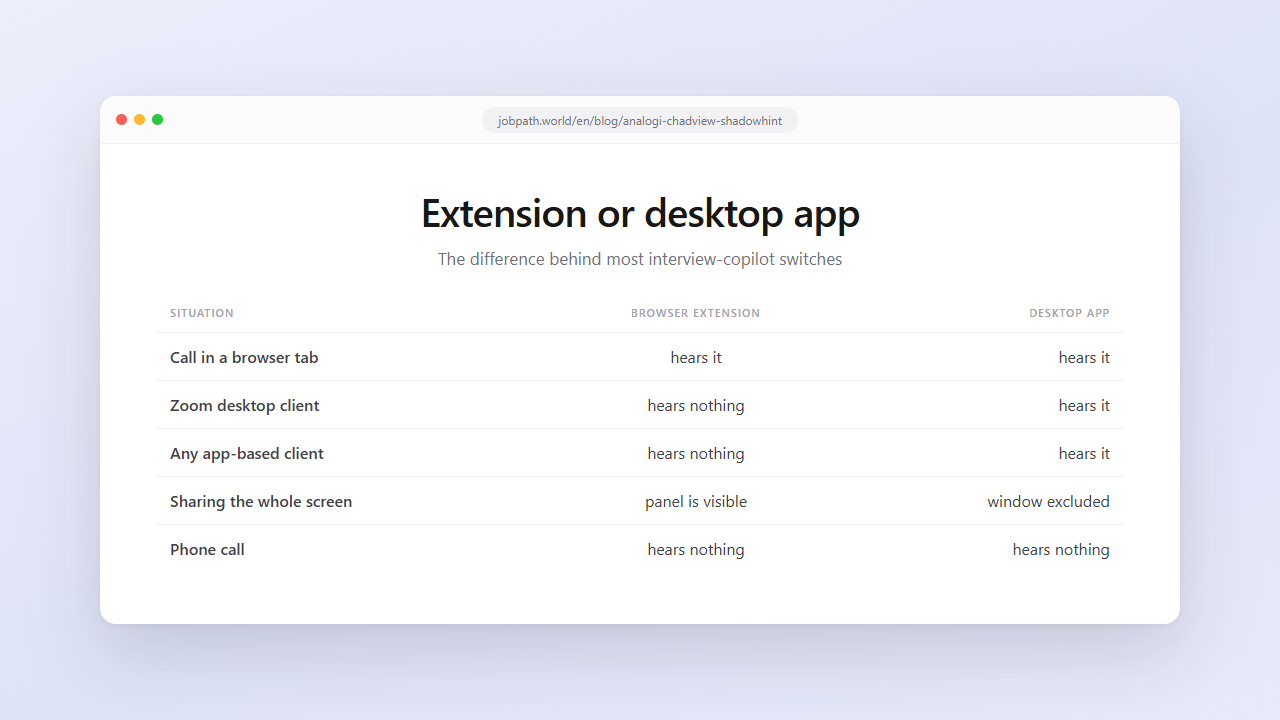
A browser extension listens to the audio of a browser tab. Prompts appear only if the call is running in the browser. The interviewer sends a Zoom link, you open it in the desktop client, and the extension hears nothing. Same for any meeting client that opens as an app, and for a phone call.
A desktop app listens to system audio output. The call can run in a browser, the Zoom client, Teams or Discord. ShadowHint and JobPath both work this way, but still check the list of supported apps: per ShadowHint's site as of September 29, 2026, Zoom and MTS Link work through the browser there.
The second half of the difference is what happens during screen sharing. An extension's panel lives inside the browser window, so if you share your whole screen or that window, the panel goes out with it. A desktop app can ask the operating system to exclude its window from capture, whatever you share. Check which systems that covers: in JobPath, hidden mode works on Windows and macOS, and the Linux app is a beta without it.
Practical conclusion: if prompts "sometimes don't work", the cause is usually that the call opened in an app rather than a tab.
The pre-switch checklist
1. Use up the subscription you have. Refund terms in this category are usually limited, so read them before you count on getting money back. If a month is paid for, finish it while testing the replacement on a free tier.
2. Check your OS. Linux builds are rare in this category. ShadowHint, per their site as of September 29, 2026, ships Windows and macOS apps. JobPath has a Linux app, but it's a beta without hidden mode. If you're on Linux, the shortlist gets short, so check the download page before anything else.
3. Check where the audio lives. How do you usually join calls: in a tab or in an app? If it's an app, an extension is out by design.
4. Test transcription on your real vocabulary. Say a sentence mixing your working language with English technical terms and read the transcript. That's the main place products break for non-English speakers.
5. Measure latency. More than three seconds between the end of the question and text on screen means you'll have started answering on your own.
6. Confirm there's a free test. Points 3 to 5 can only be checked on a live call. A product with no free tier makes you pay blind. ShadowHint and JobPath both give 15 free minutes a month (ShadowHint per their site as of September 29, 2026), and JobPath adds one mock interview a month.
Try JobPath on your own call: download the app, 15 free minutes a month, no card.
Where people move to
| If the problem is | Look at |
|---|---|
| The extension can't hear a call in an app | any desktop copilot |
| No Linux build | JobPath (Linux beta, no hidden mode) |
| The price went up | products with short paid periods |
| You need one short period | week-long plans rather than a month |
| You also need applications sent | ShadowHint (hh, per their site) or JobPath (hh, plus LinkedIn on Premium in beta) |
| You want to verify before paying | anything with a free live allowance, such as ShadowHint or JobPath (15 minutes a month each) |
Detailed prices for the western products are in the alternatives breakdown; the Russian-market ones are compared in a separate review.
Prices move fast here
The category reprices every few months, and not always downward. For reference, here is what we saw on September 29, 2026:
- ShadowHint, per their site: the unlimited plan is 2,499 ₽ a month, 4,999 ₽ for 3 months or 11,999 ₽ a year.
- JobPath: Basic is 999 ₽ a month and Premium 2,499 ₽ a month. Paid quarterly, that's 699 and 1,749 ₽ a month; paid yearly, 599 and 1,499 ₽ a month.
These figures will drift, so treat them as a snapshot.
The rule that follows: open the pricing page before renewing. "Same as last year" is not a safe assumption in this category.
The common mistake
Changing tools rarely fixes a problem that wasn't the tool.
If interviews fail at the same points every time (the self-introduction, the reason for leaving, the salary question), a new vendor changes nothing. A prompt gives you phrasing. Confidence comes from practice, and the interviewer can hear whether you're explaining or reading aloud.
What works is the combination: mock interviews before the call remove the repeating questions, and the prompt stays as insurance for the unexpected. You can test that on a free tier without cancelling anything.
JobPath is not affiliated with ChadView, ShadowHint or hh. Data checked on September 29, 2026. Found an inaccuracy? Write to hello@jobpath.world.
FAQ
Why is a browser extension worse than an app during an interview?
It only hears audio from a browser tab, so it goes silent when the call runs in a desktop client like Zoom, Teams or Discord. Its panel also lives inside the browser window and appears in a full-screen share. A desktop app listens to system audio and can keep its window out of screen capture. In JobPath that hidden mode works on Windows and macOS.
Which interview assistants run on Linux?
Few do. JobPath ships a Linux app, currently a beta without hidden mode. ShadowHint, per their site as of September 29, 2026, offers Windows and macOS apps and says a Linux version isn't available yet. For any other product, check its download page.
Will I get a refund if the assistant doesn't fit?
Refund terms here are usually limited, and each vendor spells them out in its terms. Read them, and test on a free tier before paying rather than after.
Can I run two assistants at once?
Technically yes, but on a live call it hurts: two windows with different answers and twice the attention cost. Test the new one on its free allowance while the old subscription runs out.
What should I check first in a new assistant?
Three things, on a live call: whether it hears the client you actually use, how it transcribes your real vocabulary, and how many seconds pass before an answer appears. Everything else is readable on a website; these aren't.